systemd on embedded systems: what pays off and what hurts
systemd in embedded use: cutting units and dependencies properly, optimising boot time instead of ordering, supervising services with the watchdog, keeping the journal off the flash, and running a read-only root filesystem.
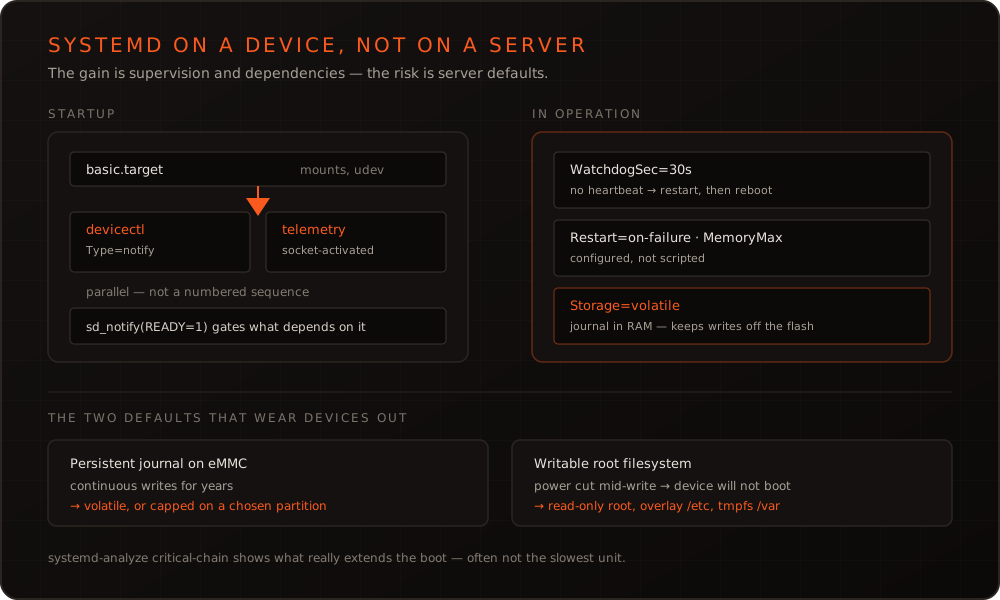
In short: systemd is not an end in itself on embedded systems, but neither is it the ballast it is often taken for. The gain lies less in a faster boot than in the things you would otherwise rebuild laboriously in shell scripts: dependencies between services, defined behaviour on failure, watchdog supervision, resource limits. The damage happens where defaults from the server world meet a device with flash storage unchanged.
What systemd actually contributes on a device
The common justification — “faster boot” — falls short. Four other points matter more:
Dependencies become explicit. A unit states what must run before it and what comes after. In a grown collection of init scripts the same information hides in numeric prefixes and sleep calls, and nobody dares touch it.
Failure behaviour is configured, not programmed. Restart=on-failure with RestartSec and StartLimitBurst describes in three lines what would otherwise be a watchdog loop in a script that has to be understood again at the next incident.
Resources can be capped. Through the cgroup integration, memory and CPU share can be limited per service. On a device that cannot swap, that is the difference between one service dying and the whole system stalling.
The hardware watchdog gets fed. systemd can both service the platform watchdog and require regular liveness signals from individual services — without any code written for it.
Cutting units without overengineering
A typical application unit is shorter than many expect:
[Unit]
Description=Device control application
After=network-online.target
Wants=network-online.target

[Service]
Type=notify
ExecStart=/usr/bin/devicectl
Restart=on-failure
RestartSec=2s
WatchdogSec=30s
MemoryMax=128M

[Install]
WantedBy=multi-user.target
Two details decide the behaviour in the field. Type=notify means the service itself reports readiness via sd_notify(READY=1) — only then do units depending on it start. Without it, a service counts as ready as soon as its process exists, which causes start-up problems that feel intermittent in anything with an initialisation phase.
WatchdogSec requires the service to send sd_notify(WATCHDOG=1) regularly. If that stops, the configured reaction kicks in — from restarting the service to rebooting the device. It replaces the hand-written supervisor process that exists in nearly every grown system.
Boot time: measure, don’t guess
If you want to shorten start-up, do not guess. systemd-analyze blame lists units by duration, systemd-analyze critical-chain shows the chain that actually extends the boot. The difference matters: a unit can take eight seconds and still be irrelevant because it runs in parallel with something longer.
The usual findings are unspectacular and repeat themselves: a service waiting on network-online.target although it needs the network much later; a sleep carried over from the init script era that someone kept just in case; a service in the critical chain that could start through socket activation the first time something talks to it. The wider picture is in the article on boot time optimisation — systemd is only one section there, and rarely the biggest one.
The two defaults that hurt devices
The journal on flash. By default journald writes to /var/log/journal if that directory exists. On a server that is correct. On a device with eMMC or an SD card it means continuous writes over years. Storage=volatile keeps the journal in RAM; where persistent logs are needed, SystemMaxUse and a deliberately chosen partition belong with it. Flash worn out after three years in the field can often be traced back to this single default.
A writable root filesystem. A device that can lose power at any moment runs considerably more safely with a read-only root. systemd copes well: /etc can stay writable through an overlay, /var can be a tmpfs, and whatever genuinely needs to persist lives on its own data partition. The effort is spent once while setting up the Yocto image and removes the class of failures where a device no longer comes up after a power cut.
When BusyBox init remains the better choice
Not every device needs this. A sensor node with 32 MB of RAM, three processes and a fixed start order is simpler, smaller and easier to reason about with BusyBox init. The boundary runs along complexity rather than memory size: as soon as services depend on each other, have to react in a defined way to failures and need supervision, you end up building a worse systemd piece by piece.
If you are facing that decision, or want to clean up an existing system, we are happy to look at it together — as part of our Embedded Linux development or as a training that walks through units, dependencies and boot analysis on your own platform.
Frequently asked questions
- Isn't systemd too heavyweight for small embedded systems?
- It depends on the class of device. On something with a few megabytes of RAM and a handful of services, BusyBox init is leaner and entirely sufficient. But as soon as you need dependencies between services, restarts on failure, watchdog supervision or resource limits, you end up writing those in shell scripts instead – usually worse than systemd does them. From roughly 64 MB of RAM and a dozen services upwards, there is little reason not to.
- How do I stop the journal from wearing out the flash?
- `Storage=volatile` in `journald.conf` keeps the journal in RAM, so it does not survive a reboot – right for many devices, since logs go to a server anyway. If persistent logging is needed, cap it with `SystemMaxUse` and `RuntimeMaxUse` and put it deliberately on a partition whose wear is accounted for. Unbounded writes to an eMMC are one of the most common reasons for failures after years in the field.
- Why does my service start too early even though After= is set?
- `After=` only controls ordering, not readiness. The previous service counts as started as soon as its process is running – not as soon as it can do any work. If you need real readiness, use `Type=notify` and have the service report via `sd_notify` when it is ready. For network dependencies, `network-online.target` is the right target, not `network.target`.
- Does systemd actually shorten boot time?
- Not automatically, but it makes boot time analysable and parallelisable. `systemd-analyze blame` and `critical-chain` show which unit actually extends the chain – often a different one than expected. The real gain comes from socket activation and removing unnecessary dependencies, not from switching init systems as such.
More on these topics
Managing Director, bitshift dynamics
Builds hardware-adjacent software for embedded products with his team – C++, Qt/QML, Embedded Linux and the Yocto Project. bitshift dynamics has worked in this field since 2005.