Optimizing Embedded Linux Boot Time: Measure Before You Tune
From power-on to first frame: how to measure an embedded Linux device's boot time credibly and find the levers in bootloader, kernel and user space that actually save seconds.
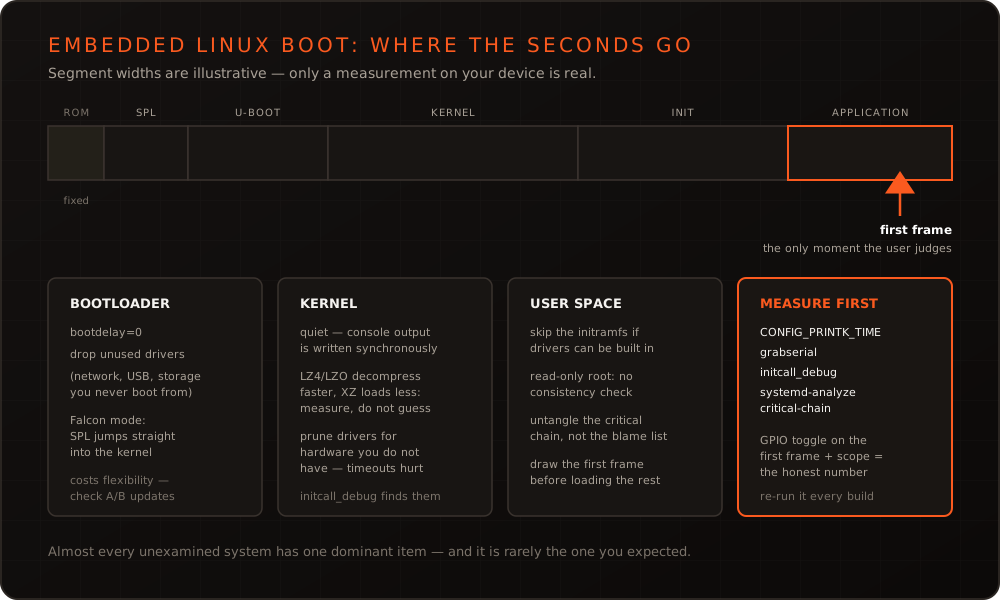
In short: Boot time is a product characteristic, not a side effect. Whether a device is usable after two seconds or fifteen shapes the impression it leaves – and in some applications decides whether it meets its requirements at all. Getting there is not a matter of applying a list of known tricks but of measuring first: only once you know which phase costs what is tuning worth the effort. Almost every unexamined system has one dominant item, and it rarely sits where you would guess.
The chain from power-on to first frame
Between power-on and a usable interface lie several stations that can be optimized independently.
The boot ROM inside the SoC loads a small first-stage loader from flash or eMMC. It is immutable and therefore the floor you cannot go below. The SPL initializes RAM and loads the actual bootloader. U-Boot initializes peripherals, locates kernel and device tree, possibly waits for input, and hands over. The kernel decompresses itself, brings up drivers and mounts the root filesystem. The init system starts services. Finally the application starts and draws its first frame.
Users do not judge the sum of these phases but the moment the device responds. That distinction matters, and we return to it below.
Measure first
Without measurement you are optimizing guesses. Four tools cover the whole chain:
Timestamps on the console. CONFIG_PRINTK_TIME prefixes every kernel message with a timestamp. On the bootloader side, a tool such as grabserial records serial output with host-side timestamps and closes the gap before the kernel starts.
Initcall analysis. The kernel parameter initcall_debug logs every initialization function together with its duration. That exposes drivers running into timeouts – a single one often costs more than every micro-optimization combined.
# After boot: surface the most expensive initcalls
dmesg | grep initcall | sort -t' ' -k2 -rn | head -20
User space analysis. With systemd, systemd-analyze blame lists the slowest services and systemd-analyze critical-chain shows the path that actually gates startup – the more useful of the two, because a slow service is irrelevant as long as it starts alongside everything else.
The honest reference point. The most defensible measurement is a GPIO toggled by the application after its first drawn frame, captured on an oscilloscope against the supply rail. That measures what the customer experiences – including the boot ROM and every contribution no software will ever log.
Where the time usually goes
| Phase | Typical time sinks | Effective levers |
|---|---|---|
| SPL / U-Boot | bootdelay, network and USB init, slow loading | bootdelay=0, drop unused drivers, Falcon mode |
| Kernel | Decompression, drivers hitting timeouts, talkative console | Right compression format, quiet, prune drivers |
| Root filesystem | Large initramfs, filesystem check, slow media | Small or no initramfs, read-only root, squashfs |
| Init / services | Serialized dependencies, unnecessary services | Untangle the critical chain, remove services |
| Application | Full initialization before the first frame | Draw first, load the rest afterwards |
The levers in detail
Bootloader
The quickest win is usually bootdelay=0 – waiting for a keypress has no place in a production image. Next comes peripherals: a U-Boot that initializes network, USB and every storage controller while only ever loading from eMMC is giving away time. Going further leads to Falcon mode: the SPL loads kernel and device tree directly and skips full U-Boot. That can save a second or more but costs flexibility – boot menu, interactive access and some update mechanisms then need a second path. Combined with A/B updates as described in our article on secure OTA updates, this step deserves careful thought.
Kernel
Three items carry most of the weight. First, console output: every line is written out synchronously at 115,200 baud. A talkative system easily loses several hundred milliseconds here – quiet as a boot parameter is among the cheapest improvements available, at the cost of field diagnosability.
Second, compression of the kernel image. There is no universally right answer: LZ4 and LZO decompress considerably faster than gzip or XZ but produce larger images. On slow storage a smaller, more heavily compressed image can win overall because loading dominates; on fast eMMC, fast decompression almost always wins. This question can only be measured, not deduced.
Third, driver selection. Anything the device does not have does not belong in the configuration. Particularly rewarding are drivers that run into timeouts waiting for absent hardware – initcall_debug finds them reliably.
Root filesystem and init
An initramfs that exists only to load a few modules can often be dropped entirely by building the required drivers into the kernel. A read-only root filesystem skips the consistency check at startup and is the more robust choice anyway for devices that can be powered off abruptly at any moment.
For the init system, what counts is less the number of services than how they chain. systemd-analyze critical-chain shows the path that actually gates startup; frequently a dependency can be resolved or a service rearranged to run after the application starts rather than before.
Application and perceived time
The most effective lever is often not a technical one but a design decision. A device that shows a logo after 1.5 seconds and is fully usable after 6 feels faster than one that stays black for 4 seconds and is then done. An early splash from the bootloader or kernel bridges the time in which nothing would be visible anyway.
Taken to its conclusion: the application draws what the user sees first and loads the rest afterwards. For Qt interfaces that is a deliberate architectural choice – which QML components load immediately and which are deferred. We covered the background in our article on Qt in embedded environments.
What not to sacrifice
Two things are not worth trading for boot time. Update safety: a boot path without a fallback is fast right up until an update fails and the device stops starting. Signature verification: secure boot costs measurable time, and that is budgeted time – cutting it to gain a second trades a product characteristic for a security promise.
Also worth watching: boot time creeps back. A new service here, an extra driver there, and a year later the hard-won margin is gone. That is why the measurement belongs in verification – on our Embedded Testrack it runs as a regular test case against real hardware on every build, so a regression surfaces immediately rather than at the next production launch.
Anchoring it in the Yocto setup
To stop the optimization from ending up as a collection of manual tweaks, it belongs in the distribution configuration: kernel configuration as a fragment in your own layer, boot parameters through the bootloader configuration, and an image without development tools that have no business in the field. That makes boot time reproducible rather than an accident of a particular build. How we set up such layers is described under Yocto BSP & distributions and in our embedded Linux work.
Conclusion
Boot time optimization is craft, not a bag of tricks: measure, identify the dominant phase, work there, measure again. The largest gains almost always sit in a handful of items – a talkative console, a driver in a timeout, a serialized service chain, an application that does everything before the first frame. And do not overlook perceived time: an early frame is often worth more than the last three hundred milliseconds saved. If your device takes too long and you would like to know where the seconds go, get in touch.
Frequently asked questions
- Where do I start when a device boots too slowly?
- With a measurement, never with a guess. Enable timestamps on the serial console, capture the whole startup, and work out which phase costs what. In almost every unexamined system the largest single item sits somewhere other than expected – frequently in user space or in a single driver running into a timeout.
- How much does disabling the serial console gain?
- Often surprisingly much. Every line of kernel output is written out synchronously at low baud rates; on a talkative system that adds up from hundreds of milliseconds into the seconds range. Ship production images with `quiet` and enable the full console only in development images – bearing in mind that this also makes field diagnosis harder.
- Is Falcon mode worth it?
- It is worth it when the bootloader measurably costs time and hardware initialization is stable and unchanging. The SPL jumps straight into the kernel, skipping full U-Boot. The price is flexibility: interactive access, boot menus and some update mechanisms fall away or need a second path – which needs careful thought alongside an A/B update strategy.
More on these topics

Managing Director, bitshift dynamics
Builds hardware-adjacent software for embedded products with his team – C++, Qt/QML, Embedded Linux and the Yocto Project. bitshift dynamics has worked in this field since 2005.