Yocto BSP: How to Build a Board Support Package That Lasts
How a Yocto BSP layer is structured – machine configuration, kernel and device tree, U-Boot, image layout – and the rules that keep it maintainable from one Yocto LTS release to the next.
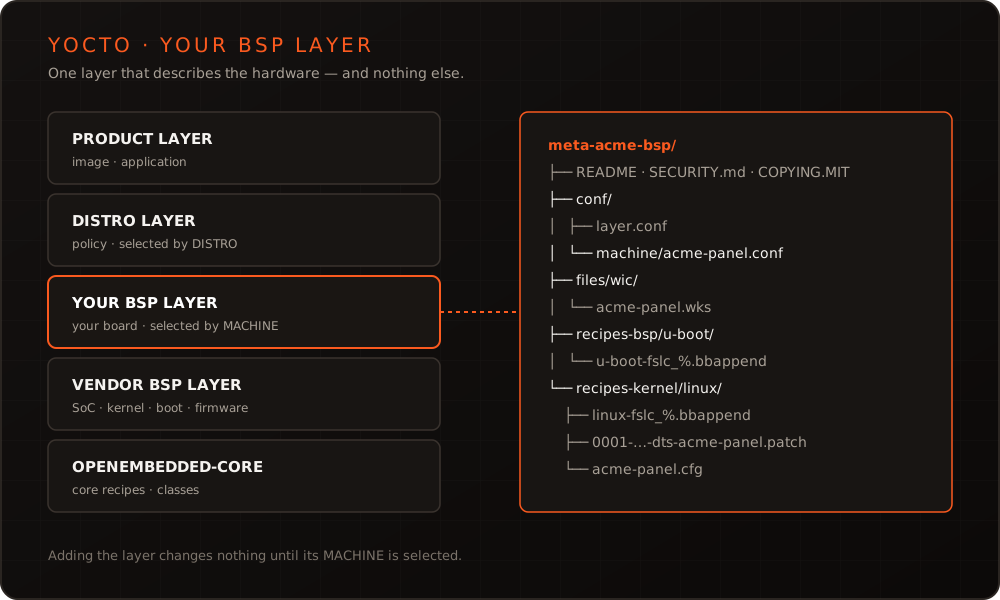
In short: A Yocto BSP is a layer that teaches the build system one piece of hardware: machine configuration, kernel, device tree, bootloader and partition layout. In real projects it is often something else – a copied vendor layer with distro settings, application recipes and hot fixes mixed in, which nobody can move to the next Yocto release. The rule that prevents this is simple: the BSP describes the hardware and nothing else, it sits as a layer of its own on top of the vendor’s, and every build is pinned and repeatable.
What a BSP is in Yocto terms
The Yocto Project’s BSP guide puts it plainly: a BSP is a special type of layer. At its centre sits the machine configuration, the file a build selects with MACHINE. It binds together everything else the layer contains – which kernel to use, which device trees to build, how the bootloader is configured, which serial console exists and which image formats the board needs.
In a product build the BSP is one layer in a stack:
| Layer | Contains | Selected by |
|---|---|---|
| Product layer | image recipes, your application, configuration | the image you build |
| Distro layer | policy: init system, distro features, security settings | DISTRO |
| Your BSP layer | your board: machine config, kernel and U-Boot changes, device tree, partition layout | MACHINE |
| Vendor BSP layer | SoC support: kernel and bootloader recipes, firmware, GPU drivers | – |
| OpenEmbedded-Core | the build system’s core recipes and classes | – |
Why the separation matters is spelled out in the Yocto Project Compatible guidelines: adding a layer to a build should not modify that build unless the user activates it by selecting a MACHINE, a DISTRO or a distro feature. A BSP layer that only takes effect once its machine is selected can be combined with any distro, tested in isolation and moved to the next release. A BSP layer that also sets the init system or installs an application cannot.
The vendor BSP: base, not destination
The vendor layer – meta-freescale, the community BSP layer for NXP i.MX, meta-ti, meta-raspberrypi and their counterparts – is the right starting point. It brings what nobody wants to rebuild: SoC support, kernel and bootloader recipes, the boot container, firmware and graphics drivers.
It is the wrong place for your changes. Edit it directly and you can no longer update it: every vendor release becomes a merge. Instead, the vendor layer stays untouched at a fixed revision, and everything that makes your board different goes into your own layer, as .bbappend files and your own configuration.
Be careful with the vendor’s machine configuration for the evaluation kit. It describes that kit, not your board. In meta-freescale, for example, the include file for the i.MX 8M Mini EVK adds the kit’s Wi-Fi and Bluetooth chips to MACHINE_FEATURES, and with NXP’s BSP selected, the EVK files append device trees for the kit’s display, audio and PCIe variants. Derive your machine from it unchanged, and you inherit hardware you do not have – and build failures for device trees that do not exist for your board.
The structure of your own BSP layer
bitbake-layers create-layer generates the skeleton. Filled in, a BSP layer for one board looks like this:
meta-acme-bsp/
├── COPYING.MIT
├── README
├── SECURITY.md
├── conf/
│   ├── layer.conf
│   └── machine/
│       └── acme-panel.conf
├── files/
│   └── wic/
│       └── acme-panel.wks
├── recipes-bsp/
│   └── u-boot/
│       ├── u-boot-fslc_%.bbappend
│       └── u-boot-fslc/
│           └── 0001-board-add-ACME-control-panel.patch
└── recipes-kernel/
    └── linux/
        ├── linux-fslc_%.bbappend
        └── linux-fslc/
            ├── 0001-arm64-dts-freescale-add-ACME-control-panel.patch
            └── acme-panel.cfg
The README and the licence file are not decoration: the BSP guide requires both for a released BSP, and the README should list the layer’s dependencies, how to build and boot it, known issues and who maintains it, including a contact address for patches. Since Yocto 6.0, yocto-check-layer also expects a SECURITY.md that says how to report vulnerabilities. The files/wic/ directory is new as well: since Yocto 6.0 (Wrynose), kickstart files for wic belong there, and a build fails if they still sit in the old wic/ or scripts/lib/wic/canned-wks/ directories. This is the kind of detail that makes a BSP move between releases cost a day instead of an hour.
conf/layer.conf identifies the layer to BitBake:
BBPATH .= ":${LAYERDIR}"
BBFILES += "${LAYERDIR}/recipes-*/*/*.bb \
            ${LAYERDIR}/recipes-*/*/*.bbappend"

BBFILE_COLLECTIONS += "acme-bsp"
BBFILE_PATTERN_acme-bsp = "^${LAYERDIR}/"
BBFILE_PRIORITY_acme-bsp = "8"

LAYERDEPENDS_acme-bsp = "core freescale-layer"
LAYERSERIES_COMPAT_acme-bsp = "wrynose"
Two lines matter more than they look. LAYERDEPENDS makes the dependency on the vendor layer explicit, so the build stops with a clear error if that layer is missing instead of producing a strange image. LAYERSERIES_COMPAT names the Yocto releases the layer is meant for – only the ones you actually build and test, not every release it might happen to work with.
The machine configuration
The machine configuration is where your board becomes a board. A sketch for a carrier board with an i.MX 8M Mini:
#@TYPE: Machine
#@NAME: ACME control panel
#@DESCRIPTION: ACME carrier board with an i.MX 8M Mini module

# SoC support from meta-freescale – deliberately not the EVK include,
# which also brings the evaluation kit's Wi-Fi chips and display variants
MACHINEOVERRIDES =. "mx8mm:"
require conf/machine/include/imx-base.inc
require conf/machine/include/arm/armv8a/tune-cortexa53.inc

# meta-freescale builds the community kernel and U-Boot (linux-fslc,
# u-boot-fslc); NXP's own linux-imx and u-boot-imx only with
# IMX_DEFAULT_BSP = "nxp". Decide this first – the bbappends depend on it.

# What makes this board this board
KERNEL_DEVICETREE = "freescale/imx8mm-acme-panel.dtb"
UBOOT_CONFIG ??= "emmc"
UBOOT_CONFIG[emmc] = "imx8mm_acme_panel_defconfig"
SERIAL_CONSOLES = "115200;ttymxc1"
MACHINE_FEATURES += "touchscreen"

# U-Boot and boot container (UBOOT_SUFFIX, UBOOT_DTB_NAME, SPL_BINARY,
# ATF_PLATFORM, DDR_FIRMWARE_NAME, ...): take the values from the EVK
# include and check each one against your board – the build stops without
# UBOOT_SUFFIX, and DDR type and boot medium differ more often than not.

# Image layout
IMAGE_FSTYPES = "wic.zst"
WKS_FILE = "acme-panel.wks"
What does not belong here is just as instructive: DISTRO_FEATURES, the init system, package versions, users, the application. All of that is policy and lives in the distro or product layer. A machine configuration that sets it turns the BSP into a distribution in disguise – and the next product on the same hardware inherits decisions it never made.
Kernel and device tree
Most product BSPs build the kernel their vendor layer provides and change it through a .bbappend. First, though, make sure which kernel that is. meta-freescale offers two: the community-maintained linux-fslc, which it builds by default, and NXP’s own linux-imx, which only builds once the machine sets IMX_DEFAULT_BSP = "nxp". A bbappend for the recipe your machine does not build changes nothing – no error, no warning, just patches that never reach the device. bitbake-getvar PREFERRED_PROVIDER_virtual/kernel shows which one it is. For the default:
# recipes-kernel/linux/linux-fslc_%.bbappend
FILESEXTRAPATHS:prepend := "${THISDIR}/${PN}:"

SRC_URI:append:acme-panel = " \
    file://0001-arm64-dts-freescale-add-ACME-control-panel.patch \
    file://acme-panel.cfg \
"
The :acme-panel override is the important part. It limits the change to your machine, so the layer leaves the kernel of every other machine alone – exactly what the compatibility rule above asks for. yocto-check-layer checks the general form of that rule: adding the layer must not change any task signature as long as its machine is not selected.
The device tree for your board comes in as a patch against the kernel tree here; alternatively, OpenEmbedded-Core’s devicetree class builds device tree sources outside the kernel tree, including overlays. Either way, the device tree is where most of a bring-up’s real work happens – we covered it in depth in device tree in practice.
Kernel options go into configuration fragments such as acme-panel.cfg, a few CONFIG_… lines each. They work with every kernel recipe that inherits the kernel-yocto class, and both kernels in meta-freescale do. The common mistake is running menuconfig in the build’s work directory and leaving it there: the change survives only until the configuration is next regenerated. bitbake -c diffconfig virtual/kernel writes the difference to a fragment.cfg in the work directory, and that file belongs in the layer. For changes to the kernel source itself, devtool modify and devtool finish turn your commits into patches in the layer instead of edits in a temporary directory – the bbappend they write adds them unconditionally, so scope the SRC_URI entry to your machine afterwards.
U-Boot follows the same pattern: a .bbappend scoped to your machine, the board support as a patch, and the defconfig named in the machine configuration.
The image layout
The partition layout lives in the .wks file referenced by WKS_FILE: where the boot container sits, which partitions exist, how large they are. For a product this is not a detail to settle later. A secure update path with A/B partitions – the approach we recommend in the Cyber Resilience Act and secure OTA updates – needs its partitions from the first image onwards. Changing the layout of devices already in the field is one of the most expensive changes a BSP can need.
Reproducible, and ready for the next release
A BSP that builds only in one developer’s directory is a prototype, not a product BSP. Three things make it reproducible:
- Pinned layers. Every layer at a fixed revision, recorded in a file under version control – with kas, or with
bitbake-setup, which arrived in Yocto 5.3 and ships with an LTS release for the first time in 6.0. No floating branch heads, noAUTOREVin a product build. - One branch per Yocto release. The BSP layer gets a branch per release it supports, named after it, with
LAYERSERIES_COMPATto match. A fix lands on every branch that is still in support. - A CI build plus a boot test. Every change builds the image and runs
yocto-check-layer --machines acme-panelagainst the layer. Then the image boots on real hardware – a BSP that builds but no longer brings up the display is not caught by a build log. That is what our article on hardware-in-the-loop testing is about.
The release calendar sets the pace. A new LTS release appears every two years and is supported for four; the releases in between are supported for seven months. Wrynose (6.0), released in May 2026, is supported until April 2030; Scarthgap (5.0) until April 2028. Kirkstone, the LTS before that, reached its end of support in spring 2026. A product with a lifetime of ten years therefore lives through several LTS moves – and how expensive each one is depends almost entirely on how clean the BSP layer is. If you are still deciding whether Yocto is the right tool at all, our comparison of Yocto and Buildroot helps with that.
The mistakes we see most often
| Mistake | Consequence | Better |
|---|---|---|
| Vendor layer edited in place | every vendor update becomes a merge | untouched vendor layer, changes as bbappends |
| Distro policy in the machine config | the BSP decides things it should not | policy in the distro layer |
| Image and application recipes in the BSP | a second product cannot reuse the board | a separate product layer |
| bbappends without a machine override | the layer changes other machines’ builds | :append:<machine> and similar |
| Kernel options set in the work directory | lost at the next clean build | fragments via diffconfig |
| Floating revisions | two builds, two different images | every layer and SRCREV pinned |
| No README, no maintainer | knowledge leaves with one person | README as the BSP guide describes it |
None of these is exotic, and each one is cheap to avoid at the start and expensive to remove later.
Conclusion
A durable Yocto BSP is mostly a matter of discipline: a layer of its own on top of the untouched vendor layer, a machine configuration that describes hardware and nothing else, bbappends scoped to the machine, kernel options as fragments, everything pinned and tested on real hardware. Then the move to the next LTS release is a planned piece of work rather than a project of its own.
If you are building a BSP, taking over an inherited one or planning the move to Wrynose, our Yocto BSP & distributions service does exactly that; the board bring-up beneath it is part of our Embedded Linux development. If your team would rather build the knowledge itself, the Yocto training covers layers, recipes and BSP work hands-on. Or simply get in touch.
Frequently asked questions
- What is the difference between a BSP layer and a distro layer?
- The BSP layer describes hardware: machine configuration, kernel, device tree, bootloader and firmware. The distro layer describes policy: init system, distro features, security settings and package choices. A build selects the first with MACHINE and the second with DISTRO. Keeping them apart is what lets you put the same distribution on a second board, or a second distribution on the same board.
- Can we use the vendor BSP as it is?
- To get started, yes. For a product, put your own BSP layer on top of it, pin the vendor layer to a fixed revision and make every change through bbappends. The vendor's machine configuration describes their evaluation kit, including chips and display variants your board does not have.
- Which Yocto release should a new product start on?
- On the current LTS release, provided your SoC vendor's layer supports it. That is Wrynose (6.0), released in May 2026 and supported until April 2030. Scarthgap (5.0) is supported until April 2028 – a product on it has time, but should plan the move rather than wait for the deadline.
- How do we keep a BSP maintainable across Yocto releases?
- One branch per Yocto release, LAYERSERIES_COMPAT set to the releases you actually build, all layers pinned, and yocto-check-layer plus a boot test on real hardware in CI. Patches that belong upstream – a device tree for a public module, a driver fix – should go there, because every patch you carry has to be carried again at the next release.
More on these topics
Managing Director, bitshift dynamics
Builds hardware-adjacent software for embedded products with his team – C++, Qt/QML, Embedded Linux and the Yocto Project. bitshift dynamics has worked in this field since 2005.