Yocto vs. Buildroot: The Four Questions That Decide It
Product lifetime, team, update strategy, compliance – the four questions that settle Buildroot vs. Yocto, and what each build system costs you day to day.
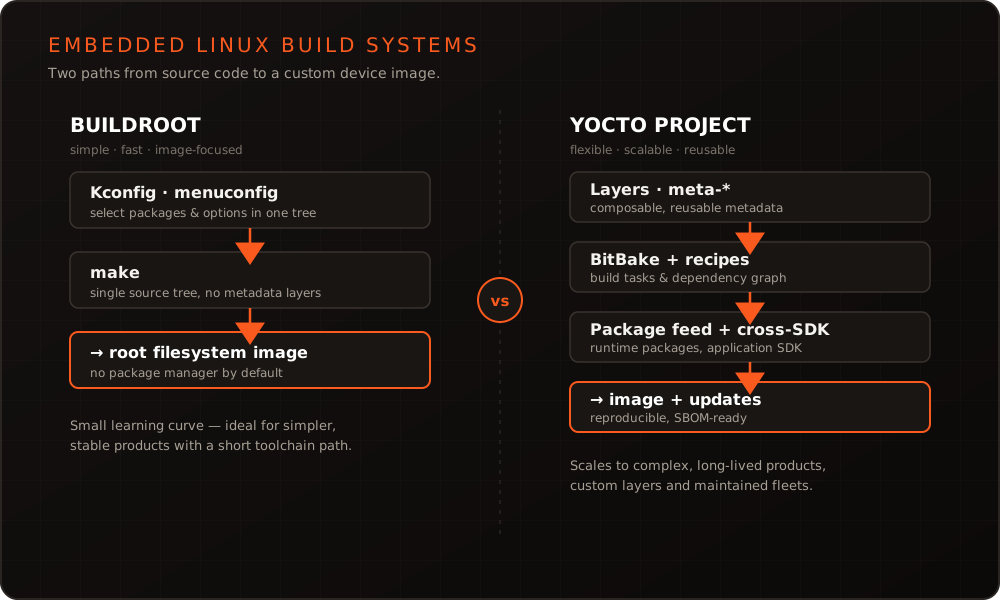
In short: Buildroot and the Yocto Project both compile a custom Linux from source, but they answer different questions. Buildroot optimizes for simplicity and speed — one Kconfig tree, make, a lean image you can grasp in an afternoon. Yocto optimizes for flexibility and scale — layers, recipes, on-target package management, a matching SDK, and reuse across a whole product line. The right choice follows from your product’s lifetime, your team, your update strategy, and your compliance obligations — not from which tool is “better” in the abstract.
What both build systems actually do
Both tools solve the same core problem: turning a bootloader, kernel, C library, and a hand-picked set of user-space packages into a bootable, tailored image, cross-compiled for a specific board. Neither is a distribution you install. Both are frameworks that build a distribution from source, so only the components you explicitly ask for end up in the root filesystem. That is the decisive difference from flashing a general-purpose distribution or a vendor image onto a device, an approach we contrast in detail on our Embedded Linux service page.
Where they diverge is philosophy. Buildroot treats the image as the output of a single, self-contained configuration. Yocto treats the image as one product of a layered, composable metadata system that can feed many devices. Grasping that difference is more useful than any feature checklist, because it explains every trade-off that follows.
The Buildroot approach
Buildroot is deliberately small. Configuration goes through Kconfig — the same menuconfig interface the Linux kernel uses — and the build is driven by plain GNU make. You select an architecture, a toolchain, a kernel, and the packages you need; Buildroot downloads, cross-compiles, and assembles them into a root filesystem image. The entire mental model fits in one head, and a newcomer can produce a bootable image within a day.
That simplicity has consequences. By default there is no package manager on the target: the image is a fixed, mostly read-only artifact, updated as a whole rather than package by package. The configuration lives in a single flat defconfig file — easy to read, but hard to share across several boards without duplication. And because Buildroot has no per-package cache comparable to Yocto’s shared state, a changed configuration often means a clean, full rebuild. When customization does grow, Buildroot offers BR2_EXTERNAL trees that keep your own packages, board configs, and defconfigs outside the main tree — a pragmatic escape hatch, though still far from Yocto’s layered model. For a well-defined single device with a stable feature set, none of this is a drawback — it is exactly the point.
The Yocto approach
Yocto inverts the priorities: flexibility and reuse first, simplicity second. Its build engine, BitBake, executes recipes (.bb files) that describe how each component is fetched, patched, configured, compiled, and packaged. Recipes are grouped into layers — self-contained, versioned metadata repositories that stack on top of one another. Board support, distribution policy, and your own applications each live in their own layer, so a new product often means recombining existing layers rather than starting over.
That structure unlocks exactly the features long-lived products need. Yocto can build on-target package feeds (rpm, ipk, or deb), generate a matching cross SDK for your application teams, and produce an SBOM in SPDX format with license and CVE tooling built in. Its shared-state cache avoids rebuilding unchanged components and so tames the otherwise heavy build times. In practice you rarely start from zero: the SoC vendor’s BSP arrives as its own layer (for example meta-freescale, meta-ti, or meta-st), community layers such as meta-openembedded supply thousands of additional recipes, and your product layer sits cleanly on top. The cost is a steeper learning curve — but for scaling product lines it pays back. We go deeper on this in our Yocto BSP work and in our article on the advantages of Yocto in industrial environments.
A concrete look: defconfig versus a layer skeleton
The contrast is clearest in the artifacts each tool asks you to write. Buildroot centers on one flat configuration file:
# configs/mydevice_defconfig — one self-contained Buildroot config
BR2_aarch64=y
BR2_TOOLCHAIN_BUILDROOT_GLIBC=y
BR2_LINUX_KERNEL=y
BR2_LINUX_KERNEL_DEFCONFIG="myboard"
BR2_TARGET_ROOTFS_EXT4=y
BR2_PACKAGE_DROPBEAR=y
Yocto spreads the same intent across a layer of structured metadata — a directory of recipes rather than a single file:
meta-mydevice/
├── conf/layer.conf
├── recipes-core/images/mydevice-image.bb
└── recipes-apps/hello/
    ├── hello_1.0.bb
    └── files/hello.c
# recipes-apps/hello/hello_1.0.bb — a minimal Yocto recipe
SUMMARY = "Minimal example application"
LICENSE = "MIT"
LIC_FILES_CHKSUM = "file://${COMMON_LICENSE_DIR}/MIT;md5=0835ade698e0bcf8506ecda2f7b4f302"
SRC_URI = "file://hello.c"
do_compile() {
${CC} ${CFLAGS} ${LDFLAGS} hello.c -o hello
}
do_install() {
install -d ${D}${bindir}
install -m 0755 hello ${D}${bindir}
}Neither is inherently better. The defconfig is faster to write and read; the layer is more verbose but composable, versionable, and reusable across products.
Head to head
| Criterion | Buildroot | Yocto Project |
|---|---|---|
| Learning curve | Low — Kconfig + make | High — BitBake, layers, recipes |
| First bootable image | Hours | Days |
| Build speed / rebuilds | Fast, but often full rebuilds | Heavy first build, fast via sstate |
| Flexibility | Good within one image | Very high, layered and composable |
| On-target package management | None by default | Optional (rpm/ipk/deb) |
| License & SBOM tooling | Basic (make legal-info) | Built in (SPDX, cve-check) |
| Long-term maintenance | Quarterly releases, yearly LTS, more self-carried | Multi-year LTS branches with backported fixes |
| Team-size fit | Small teams, single product | Larger teams, product lines |
| Cross-product reuse | Limited (copy the defconfig) | Native (recompose layers) |
How to decide
Four questions settle most cases. Product lifetime: a device maintained for many years, with recurring security updates and audit trails, leans toward Yocto; a fixed-function unit with a short, stable life is well served by Buildroot. Team situation: a small team shipping one device benefits from Buildroot’s low overhead, whereas several teams sharing board support and applications across products need Yocto’s layers. Update strategy: if you deploy A/B image updates with tools such as RAUC or Mender, both fit, but on-target package feeds and staged rollouts favor Yocto. Licensing and compliance: obligations such as the EU Cyber Resilience Act push toward Yocto’s built-in SBOM and CVE tooling. (This is general engineering guidance, not legal advice — confirm the requirements and any timelines that apply to your product with qualified counsel.) When these pull in different directions, weigh the one that dominates your risk; an outside view often shortens that decision.
Start simple, grow into Yocto
The two systems are not mutually exclusive, and the choice is not irreversible. Buildroot is an excellent way to bring up a new board quickly and validate hardware before the product architecture is settled. The kernel configuration, device tree, and bootloader work you do there carry directly over to a later Yocto setup — only the packaging metadata is rebuilt as layers and recipes. Many teams take exactly this path: prototype on Buildroot, then migrate to Yocto once a product becomes a product line. Planning that transition before the codebase grows keeps it cheap. We cover both build systems in our trainings, and our portfolio shows where each has been the right call.
Conclusion
Buildroot and Yocto are not competitors so much as answers to different questions. Buildroot rewards you with speed and simplicity when the scope is contained; Yocto rewards you with flexibility, reuse, and compliance tooling when the product must scale and last. Match the tool to your product’s lifetime, team, and obligations, and the decision becomes clear rather than ideological. If you would like a second opinion on the right build system for your device, get in touch with us.
Decision helper: Yocto or Buildroot?
Four questions – the same four that settle it above. You get no score, but the reasoning behind the answer, plus a note when your answers pull in different directions.
Answer all four questions to see the result.
Recommendation
The Yocto Project
Your answers land clearly on the side where the up-front cost pays for itself. Expect a steep first week and plan time for the layer structure – the decisions made there determine how maintainable this is in five years.
Buildroot
Nothing in your answers calls for Yocto's complexity. Buildroot gets you to a bootable image faster, and the build stays readable for the whole team.
Either is defensible
Your answers do not produce a clear picture – that is a real result, not a gap in the questionnaire. In this situation the tool does not decide it; what decides it is which risk you least want to carry: the learning curve today, or the rebuild in two years.
Your answers pull both ways. When that happens, weigh the criterion that carries your biggest risk rather than the majority of the points.
Argues for Yocto
Argues for Buildroot
No bearing
The choice is not final: the kernel configuration, device tree and bootloader work from a Buildroot setup carry straight over into a later Yocto project – only the packaging is rebuilt.
These four questions cover the common case, not your special one. If you would like to talk the decision through against concrete hardware:
A second opinion on your case →Frequently asked questions
- Does the answer change if you look at it as Buildroot vs Yocto rather than the other way round?
- No — the comparison is symmetric, and which name comes first only reflects where a team is starting from. Coming from Buildroot, the question is usually whether the added complexity of layers and recipes is worth it; coming from Yocto, whether the project could get by with something far simpler. Both end at the same criteria: how long the product is maintained, whether licence manifests and SBOMs are required, and how much variance the hardware has.
- Which is faster to learn, Buildroot or Yocto?
- Buildroot, by a wide margin — a single Kconfig menu and `make` produce a bootable image in an afternoon. Yocto's layers, recipes, and BitBake take considerably longer to internalize, an investment that only pays off once you actually need its flexibility and scale.
- Can Buildroot generate a license report or an SBOM?
- Buildroot produces license manifests via `make legal-info`, which is adequate for a single, well-defined image. Yocto goes further with built-in SPDX SBOM generation and `cve-check`, which matters most for regulated, long-maintained products under rules like the Cyber Resilience Act.
- Can we start with Buildroot and switch to Yocto later?
- Yes. Kernel configuration, device tree, and bootloader work carry over, so a Buildroot prototype is a legitimate way to bring up hardware early. Migrating means rebuilding the packaging metadata as layers and recipes, so it is cheapest to plan the switch before a product turns into a product line.
More on these topics
Managing Director, bitshift dynamics
Builds hardware-adjacent software for embedded products with his team – C++, Qt/QML, Embedded Linux and the Yocto Project. bitshift dynamics has worked in this field since 2005.