Qt for Embedded: What It Really Takes on Real Hardware
Qt for Embedded Linux, Qt for MCUs or plain cross-compiled Qt? What the term covers, what EGLFS and hardware acceleration demand, and where boot time goes.
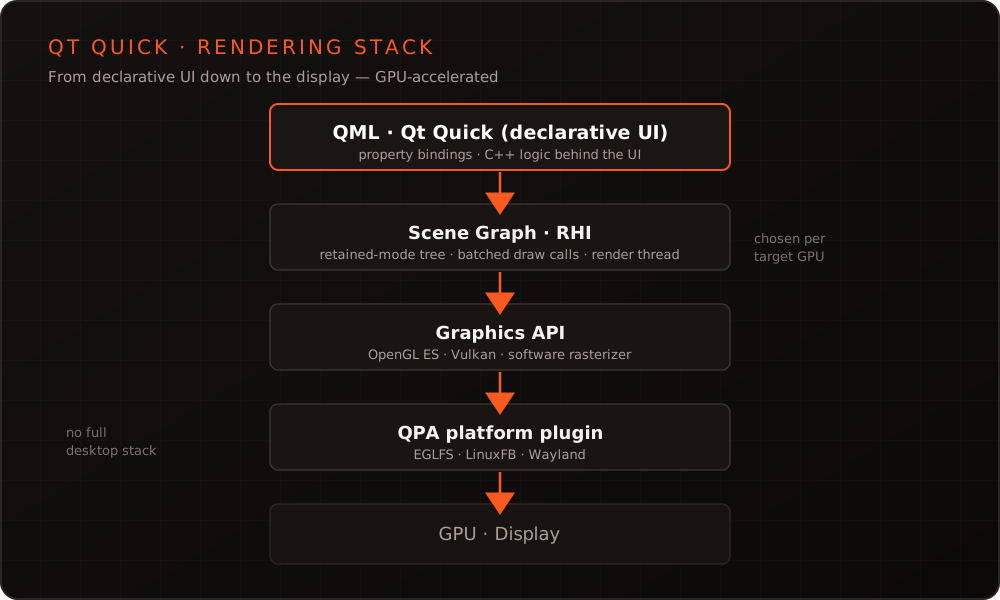
In short: Qt is a C++ framework whose declarative UI language, QML, pairs with the GPU-accelerated Qt Quick scene graph to carry the same smartphone-grade interface from an industrial panel down to a microcontroller – all without running a full desktop stack on the device.
Expectations of the user interfaces on embedded devices have risen sharply in recent years. Users unconsciously compare the HMI of an industrial machine with their smartphone – fluid animations, clear design, instant response. Qt meets that expectation even on modest hardware because it works with the target’s GPU rather than against it.
What people mean by Qt embedded varies more than the term suggests: it can be a panel running full Qt for Embedded Linux, a headless board with a small QML front end, or Qt for MCUs on a microcontroller with a few hundred kilobytes of RAM. The sections below walk through the levers that matter across all of them: the scene graph, the display stack, hardware acceleration, boot time, and where the line between those variants actually runs.
How does Qt Quick deliver smartphone-grade HMIs on weak hardware?
The key is the Qt Quick scene graph. Instead of repainting every frame with CPU drawing calls, Qt Quick builds a persistent tree of rendering nodes (retained mode) and hands it to the GPU. Nodes that share a material – for example all glyphs of one font, or all rectangles of one color – are batched into a handful of draw calls, which minimizes state changes and thus the most expensive part of talking to the GPU.
With QML, developers describe the interface declaratively through property bindings, while the compute-intensive logic stays in C++. Just as important: where the platform allows it, rendering runs on a dedicated render thread. Animations advance there, decoupled from the GUI thread – so a short computation in application code will not make the interface stutter.
Rectangle {
    width: 320; height: 64
    radius: 12
    color: pressed ? "#0891b2" : "#131c2e"
    Behavior on color { ColorAnimation { duration: 150 } }

    property bool pressed: false
    Text { anchors.centerIn: parent; text: "Start"; color: "white" }
    TapHandler { onTapped: parent.pressed = !parent.pressed }
}
The color animation runs smoothly because it is processed in the scene graph, not in the application loop. That same split between declarative UI and close-to-the-metal logic is why Qt projects divide cleanly between a QML front end and a C++ back end.
EGLFS, LinuxFB or Wayland – which display stack fits?
In embedded use there is no need for a full desktop. Qt ships several platform plugins (QPA) that target the hardware directly – the right choice mostly comes down to whether a GPU is present and whether several processes need to share one screen.
| Backend | Rendering | Windows | Fits |
|---|---|---|---|
| EGLFS | GPU via EGL/OpenGL ES (e.g. eglfs_kms on DRM/KMS) | One full-screen window | The default for single-app HMIs with a GPU |
| LinuxFB | Software raster to /dev/fb0 | One full-screen window | Hardware with no GPU at all |
| Wayland | GPU, as a client or your own compositor | Multiple windows/processes | Multi-window, multi-app scenarios |
EGLFS is the first choice for most devices: it renders straight to the GPU with no display-server overhead, saving memory, boot time and attack surface. When no GPU is present, Qt Quick keeps running with its software backend (QT_QUICK_BACKEND=software) over LinuxFB – slower, but functional. Once several processes must draw to one display at the same time, the Qt Wayland Compositor comes in, letting you build a lean, device-specific compositor without dragging in a full desktop.
OpenGL ES or Vulkan: how is acceleration chosen?
In Qt 6 the scene graph no longer draws against OpenGL directly but against the RHI (Rendering Hardware Interface) – an abstraction mapped at runtime onto OpenGL ES, Vulkan, Metal, Direct3D or a pure software rasterizer. For embedded that means you pick the backend to match the target’s GPU driver without touching the UI codebase.
- OpenGL ES 2.0/3.x is the broad common denominator, available on virtually every embedded GPU – a safe starting point.
- Vulkan pays off when the graphics driver supports it reliably and you want lower overhead or finer control.
- On systems without a 3D GPU the software rasterizer takes over; some MCU-class SoCs accelerate 2D blitting instead.
Choosing the backend – and making sure the right GPU driver even ships in the board support package – is part of the Embedded Linux and Yocto BSP work, long before the first line of QML is rendered.
How do you cut boot-to-first-frame and memory footprint?
Two figures shape the first impression: the time to the first visible frame and the RAM in use. Both can be driven down deliberately.
For boot time, the Qt Quick Compiler (qmlcachegen) helps: it translates QML into bytecode or C++ at build time, so nothing needs to be parsed at startup. In Qt 6 this happens automatically once QML is added through a QML module:
qt_add_executable(panel main.cpp)
qt_add_qml_module(panel
    URI Panel
    QML_FILES Main.qml
)
# qt_add_qml_module invokes qmlcachegen: QML is compiled
# ahead of time and need not be parsed at startup.
target_link_libraries(panel PRIVATE Qt6::Quick)
More levers for startup time and memory:
- Show the UI first: render a lightweight first frame immediately, load expensive initialization asynchronously, and instantiate components on demand with
Loader. - Text as distance fields: Qt renders fonts through distance-field glyphs by default – pre-generated glyph caches save CPU and memory at runtime.
- Assets for the target resolution: ship images at the right size with GPU texture compression (ETC2/ASTC) instead of scaling at runtime.
- A lean Qt build: a feature-reduced configuration and a trimmed
meta-qt6image in the Yocto build put only the modules you actually use on the device.
Qt for MCUs or Qt for Embedded Linux?
Not every device has an MMU-capable processor running Linux. Qt covers both worlds, but with different runtimes. Qt for Embedded Linux is the full Qt framework and assumes a Linux-capable SoC. Qt for MCUs (Qt Quick Ultralite) is a separate, lean graphics engine for microcontrollers on bare metal or an RTOS: it understands a QML subset, compiles it ahead of time to C++, and renders via 2D blitters, small GPUs or software – running in a few hundred kilobytes of RAM.
| Criterion | Qt Widgets | Qt Quick / QML | Qt for MCUs |
|---|---|---|---|
| Rendering | CPU raster (QPainter) | GPU scene graph (RHI) | Qt Quick Ultralite (2D HW/GPU or software) |
| Language | C++ | QML + C++ | QML subset + C++ |
| Target hardware | Linux/desktop with CPU | Embedded Linux with GPU (software backend possible) | Microcontroller (bare metal/RTOS) |
| Typical RAM | a few MB | tens of MB | a few hundred KB to a few MB |
| Animation/touch | functional, limited fluidity | fluid, gesture-rich | fluid at MCU scale |
| Best for | dense tooling and configuration UIs | modern touch HMIs | cost-sensitive high volume |
Qt Widgets is not a dead end here: for dense, form-heavy configuration or service screens, the classic widget stack is often the more pragmatic choice. For animated touch HMIs, though, there is no way around Qt Quick.
One codebase from development to the field
An often underestimated advantage: the same Qt codebase runs on the developer desktop and on the target device. Development and testing happen comfortably on the PC, and deploying to the hardware changes nothing about the logic. This shortens iteration cycles considerably – especially alongside a reproducible Yocto build that binds framework, drivers and application together deterministically.
Conclusion
Qt combines modern, appealing interaction concepts with the efficiency that embedded systems demand. The decisive factor is a team that knows the levers – from choosing the graphics backend and hardware acceleration to boot-time optimization. We also teach these fundamentals in our Qt/QML and Embedded Linux trainings. You will find examples of delivered projects in our portfolio; if you are planning a specific HMI, get in touch.
Frequently asked questions
- What does "Qt embedded" actually mean – is it one product?
- It is a bracket around three quite different things. Qt for Embedded Linux is the full framework on a Linux target, rendering through EGLFS or Wayland. Qt for MCUs is a separate product for microcontrollers without an operating system, with its own QML subset and renderer. And plenty of projects simply mean regular Qt cross-compiled for an ARM board. The term alone does not tell you which one is meant, so it is worth settling early — the licence terms, the tooling and the achievable UI complexity differ substantially.
- Do I strictly need a GPU for a Qt Quick HMI?
- No. With the software backend, Qt Quick runs without 3D acceleration, and Qt Widgets renders on the CPU anyway. For genuinely fluid, animated interfaces, though, a GPU is clearly recommended.
- Can Qt be used for free?
- Qt is available under both commercial and open-source licenses (LGPLv3/GPLv3). Some embedded-specific components – such as Qt for MCUs and the Boot-to-Qt stack – are commercial-only. The licensing choice should be made early and per project.
- How fast does a Qt HMI reach its first frame?
- That depends on the SoC, memory type and init chain and cannot be quoted as a blanket figure. With pre-compiled QML, an early first frame and a lean boot path, very short times to a visible image are realistic – measured per device.
More on these topics

Managing Director, bitshift dynamics
Builds hardware-adjacent software for embedded products with his team – C++, Qt/QML, Embedded Linux and the Yocto Project. bitshift dynamics has worked in this field since 2005.