Migrating From Qt 5 to Qt 6: A Roadmap for Embedded Projects
How to make a Qt 5 to Qt 6 migration predictable in embedded projects: qmake to CMake, Qt5Compat, the new RHI-based graphics stack, and the sequence that keeps risk low.
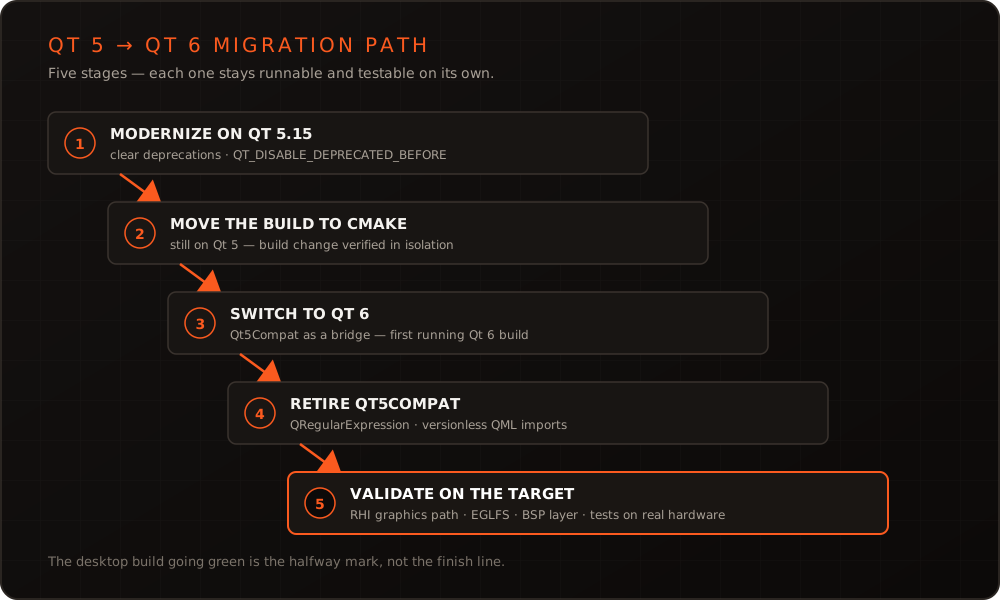
In short: A Qt 5 to Qt 6 migration rarely fails over individual API changes – it fails because too many fronts are opened at once. Breaking the move into stages and keeping every stage runnable turns an open-ended project into a series of manageable steps: modernize on Qt 5.15, move the build system to CMake, switch to Qt 6, then retire the compatibility layer. On embedded targets a fifth task appears that stays invisible on the desktop: the rebuilt graphics stack.
Why the move eventually lands on your desk
Qt 6.0 shipped at the end of 2020, and the Qt 6 line has produced several LTS releases with 6.2, 6.5 and 6.8. Qt 5.15 was the last Qt 5 version with long-term support; its open-source support has ended, and commercial terms change over the years – check the current state directly with The Qt Company.
The real pressure, though, rarely comes from a support calendar. It comes from hardware. A new SoC brings a newer Yocto release, which brings a newer compiler and newer system libraries – and at some point an old Qt 5 no longer builds cleanly inside it. Postponing the migration until that moment means doing it under time pressure alongside a board bring-up. That is the most expensive possible order.
What actually changes
The jump from 5 to 6 is not a break on the scale of Qt 3 to Qt 4. Most of a typical application compiles after modest adjustments. The work concentrates in four areas.
The build system. Qt 6 itself is built with CMake, and CMake is what the documentation, tooling and examples target. Applications can still be compiled with qmake, but every extension – a new module, a Qt Quick compiler step, an additional target – leads back to the supported route.
Removed and relocated APIs. Classes such as QRegExp and QTextCodec have not vanished; they moved into the Qt5Compat module. That is a bridge, not a destination: it keeps the migration moving while the replacements – QRegularExpression in place of QRegExp, for instance – happen gradually. Qt Quick Controls 1, by contrast, was removed outright; if your UI still builds on it, that is the single largest item. Qt Multimedia was also rewritten for Qt 6, which warrants its own assessment for anything with a camera or video path.
The graphics stack. In Qt 6, Qt Quick no longer renders directly against OpenGL but through the RHI, an abstraction over each platform’s graphics API. On the desktop this is barely noticeable. On an embedded board with EGLFS, a vendor-specific EGL and a GPU driver whose quirks you have learned over years, this is where a migration costs time.
C++ standard and language details. Qt 6 requires C++17 or newer. For projects stuck on an older standard that is a welcome excuse – we covered the practical consequences in our article on modern C++ for embedded systems. Add to that smaller changes such as the unification of QList and QVector, most of which the compiler will find for you.
The sequence that keeps risk low
The most common misstep is switching Qt version, build system and compiler at the same time. When something then breaks there are three suspects and no working intermediate state. The following staging avoids that:
| Stage | Work | Result |
|---|---|---|
| 1 | Move to Qt 5.15, clear deprecation warnings | Running application free of outdated calls |
| 2 | Move the build to CMake – still on Qt 5 | Build change verified in isolation |
| 3 | Switch to Qt 6 with Qt5Compat as a bridge | First running Qt 6 version |
| 4 | Retire Qt5Compat, move QML to versionless imports | No transitional dependencies left |
| 5 | Validate graphics stack and platform plugin on target | Confirmed behaviour on the real device |
Stage 1 is the most effective and the most frequently skipped. Qt 5.15 already knows nearly every deprecation that becomes an error in Qt 6. Setting QT_DISABLE_DEPRECATED_BEFORE makes the compiler reject old calls outright instead of merely warning about them – which turns the migration into a list of compiler errors you can work through while the application keeps running throughout.
A concrete look: from .pro to CMakeLists
The build switch looks larger than it is. A typical qmake file:
# app.pro
QT += quick
CONFIG += c++17
SOURCES += main.cpp
RESOURCES += qml.qrc
TARGET = myapp
The same intent in CMake, the way Qt 6 expects it:
cmake_minimum_required(VERSION 3.21)
project(myapp LANGUAGES CXX)

set(CMAKE_CXX_STANDARD 17)
set(CMAKE_CXX_STANDARD_REQUIRED ON)

find_package(Qt6 REQUIRED COMPONENTS Quick)
qt_standard_project_setup()

qt_add_executable(myapp main.cpp)
qt_add_qml_module(myapp
    URI MyApp
    VERSION 1.0
    QML_FILES Main.qml
)
target_link_libraries(myapp PRIVATE Qt6::Quick)
The gain is not in the syntax but in QML modules becoming explicit. Instead of a resource file with QML files loosely filed away, qt_add_qml_module describes a named, versioned module – the prerequisite for tooling to check and compile QML ahead of time at all.
What embedded targets add
On the desktop a migration ends at a green build. On a device that is where the real test starts.
The BSP has to cooperate: the Qt 6 layer must match the board’s Yocto release, and jumping several Yocto releases drags kernel, toolchain and system libraries along. Running the Qt migration and the BSP update as two separate, individually verified steps is markedly cheaper than doing both at once – even though it looks like more work at first. How we build and maintain such layers is described under Yocto BSP & distributions.
The graphics path needs deliberate checking: does EGLFS run with the vendor backend? Does the application behave as before under screen rotation, multi-display or touch calibration? And does startup time stay within budget when a different rendering route is taken? The background is in our article on Qt in embedded environments.
Finally, verification. A migration changes very little in a thousand places and a great deal in a few – without automated tests on real hardware, which of the two you just hit remains an open question. That is exactly what our Embedded Testrack is built for: every build runs on the real device through its real interfaces, so a regression in the graphics or input path surfaces immediately rather than at the customer site.
Estimating the effort honestly
A defensible estimate comes not from line counts but from four questions. How much QML is there, and does it use Qt Quick Controls 1? Does the application depend on modules that were rewritten for Qt 6, Multimedia above all? How idiosyncratic is the target hardware’s graphics stack? And do automated tests exist that would make a regression visible at all?
A pragmatic first move is a time-boxed spike: run stages 1 and 2 on a branch, and touch the rest only far enough to make the application start under Qt 6. After that the remaining work is usually easy to name – and the discussion turns on concrete items rather than gut feeling. We cover Qt topics of this kind in our trainings, and if you would rather hand the whole move over, that is what our Qt 5 to Qt 6 migration service does.
Conclusion
Moving to Qt 6 is not a rewrite but a chain of predictable steps – provided they are not taken simultaneously. Modernize on Qt 5.15 first, isolate the build change, treat Qt5Compat as a bridge rather than a permanent fixture, and handle the target’s graphics stack as a task in its own right. If you would like an assessment of the effort for your codebase, or a stalled migration needs unblocking, get in touch.
Frequently asked questions
- Does a Qt 6 migration have to happen in one step?
- No, and that is precisely the lever. The lowest-risk sequence separates the work: modernize on Qt 5.15 and clear the deprecation warnings first, then move the build system to CMake while still on Qt 5, and only then switch to Qt 6. Every stage stays runnable and testable on its own.
- Can we keep qmake or do we have to move to CMake?
- Qt 6 itself is built with CMake, and CMake is the path the documentation, tooling and examples are written for. Applications can still be compiled with qmake, but every extension leads back to the supported route. If you are migrating anyway, doing the build switch in the same round is the cheapest option.
- What is different about embedded compared to desktop?
- The graphics stack. In Qt 6, Qt Quick renders through the RHI abstraction rather than directly against OpenGL, so assumptions about EGL, drivers and the platform plugin need re-checking. On top of that comes the BSP: the Qt 6 layer has to match the board's Yocto release, and the application needs a run on real hardware, not just a desktop build.
More on these topics
Managing Director, bitshift dynamics
Builds hardware-adjacent software for embedded products with his team – C++, Qt/QML, Embedded Linux and the Yocto Project. bitshift dynamics has worked in this field since 2005.