Qt as a Cornerstone for Multiplatform Environments
One codebase for embedded, desktop and mobile: how Qt enables true multiplatform products through a consistent separation of logic and UI.
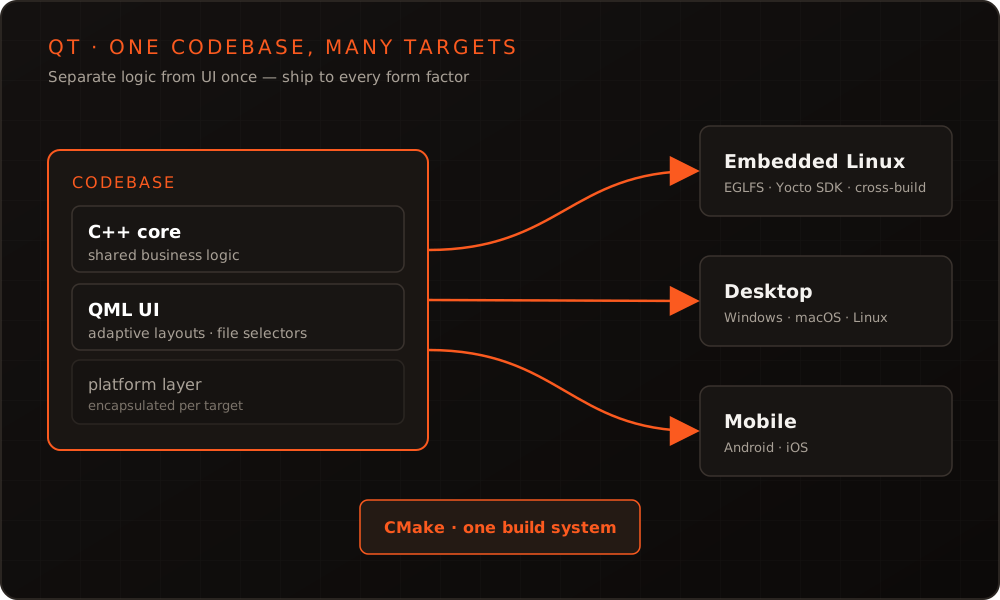
In short: with Qt you write the business logic once in platform-independent C++ and ship it through adaptable QML interfaces on desktop, embedded and mobile – one codebase, many form factors.
Many products today no longer exist as a single device, but as an ecosystem: the embedded device itself, a desktop application for configuration, a mobile app for remote monitoring. Building three platforms separately means triple the effort – and triple the opportunity for the variants to drift apart. Qt offers a compelling middle path here: the same C++/QML base runs everywhere without collapsing into a lowest common denominator.
One codebase, multiple form factors
The core idea is to build the product once and vary only the surface per device. In practice you split the project into two layers: a platform-independent core of C++ libraries (device protocols, state machines, data models, telemetry) and a thin, swappable presentation layer in QML. The core knows nothing about screen size or input method – it merely exposes models and commands. Whether those are rendered on a 7-inch touch panel bolted to a machine, in a resizable desktop window, or on a smartphone is decided by the QML layer alone.
This split is more than tidiness. It defines what is shared (the risky, expensive-to-test logic) and what may diverge per form factor (layout, navigation, interaction patterns). That avoids the classic trap of multiplatform projects: device-specific special cases eating their way deep into shared code. How this architecture rests on robust C++ cores is something we cover in detail under C++ development.
How Qt abstracts the platform
The reason a single codebase is viable at all lies in Qt’s consistent abstraction layers. Instead of programming against native APIs, you work against a stable Qt API that encapsulates the operating system underneath:
- Qt Platform Abstraction (QPA): windowing, input and the graphics context are provided through interchangeable plugins –
eglfsor Wayland on embedded Linux,xcbon desktop Linux, Cocoa on macOS, and the respective native backends on Windows, Android and iOS. - RHI (Rendering Hardware Interface): Qt 6 renders through a graphics abstraction that maps to Vulkan, Metal, Direct 3D or OpenGL depending on the target. The same QML runs on a GPU in an industrial gateway just as it does on a desktop.
- Uniform system services: file access, networking, threads, serialization and time are identical across platforms – no thicket of
#ifdeffor everyday tasks.
On embedded Linux this QPA layer is exactly the point of contact with the board support package. How a lean, reproducible target system for Qt is built is described under Embedded Linux and Yocto BSP.
Adaptive QML layouts: an interface that responds
Multiplatform doesn’t mean showing the same interface everywhere. With Qt Quick Layouts and simple state checks, the same QML file responds to the available area – a dashboard collapses into one column on a panel and fans out to three on the desktop:
import QtQuick
import QtQuick.Controls
import QtQuick.Layouts

ApplicationWindow {
    id: root
    readonly property bool compact: width < 720

    GridLayout {
        anchors.fill: parent
        columns: root.compact ? 1 : 3

        Repeater {
            model: TelemetryModel        // shared C++ model
            delegate: SensorTile {
                Layout.fillWidth: true
                label: model.name
                value: model.value
            }
        }
    }
}
Where the differences are larger than a reflow, file selectors take over: Qt automatically loads the variant from a + directory (for example +android/Dashboard.qml, or a custom selector +embedded/) without the calling code knowing about it. The shared path stays clean, and platform-specific interfaces live in exactly one defined place. These QML patterns are our daily craft in Qt/QML development.
Shared logic, separate interfaces
The contract between core and UI is a narrow interface: QObject-based models with properties and signals. QML binds to them declaratively without knowing the internals of the logic.
class DeviceController : public QObject {
    Q_OBJECT
    Q_PROPERTY(double temperature READ temperature NOTIFY temperatureChanged)
public:
    double temperature() const { return m_temperature; }
signals:
    void temperatureChanged();
    // ... shared logic for embedded, desktop and mobile
};
The same DeviceController class powers the HMI on the device, the configuration software on the desktop and the mobile app – without duplicates. A bug in the temperature calculation is fixed once and takes effect on every target immediately. The discipline behind it: only what is platform-independent belongs in the core. Everything that asks about the operating system or the screen stays above the interface.
One build for every target: CMake and CI
So that a single codebase doesn’t shatter across three toolchains, you need a build system that treats every target the same way. In Qt 6 that is CMake – first-class integrated and ideal for cross-compilation. Core and application are declared separately, so the same core links into every target variant:
cmake_minimum_required(VERSION 3.21)
project(DeviceSuite LANGUAGES CXX)

find_package(Qt6 REQUIRED COMPONENTS Quick)
qt_standard_project_setup()

# Platform-independent core – declared once, used everywhere
qt_add_library(device_core STATIC
    src/DeviceController.cpp
    src/TelemetryModel.cpp
)
target_link_libraries(device_core PUBLIC Qt6::Core)

# Executable per target platform, identical core
qt_add_executable(device_app src/main.cpp)
qt_add_qml_module(device_app
    URI Device.Ui
    QML_FILES qml/Main.qml qml/DashboardDesktop.qml qml/DashboardEmbedded.qml
)
target_link_libraries(device_app PRIVATE device_core Qt6::Quick)
For the embedded target, a Yocto SDK supplies the matching toolchain; the build is switched via -DCMAKE_TOOLCHAIN_FILE, while the source stays the same. In CI you turn this into a build matrix: one job builds natively for desktop, another cross-compiles for the board, a third for mobile. Unit tests of the core run fast and natively, while the embedded build validates compilability and packaging in parallel. That way you catch regressions on one target before they reach the customer’s device.
Qt 5 to Qt 6 as an enabler
The move to Qt 6 has strengthened this approach noticeably – it is less an obligation than an accelerator. Four points weigh especially heavily for multiplatform projects:
- CMake as the default replaces qmake and makes cross-builds and integration into existing C++ ecosystems far more straightforward.
qt_add_qml_moduleregisters QML types at compile time, which surfaces errors earlier and enables ahead-of-time compilation of QML (qmlsc) – an advantage on resource-constrained embedded hardware.- RHI decouples rendering from OpenGL and opens up modern graphics backends per platform.
- Bindable properties (
QProperty) and a C++17 foundation make the core leaner and property bindings more efficient.
A migration should be planned – Qt 5 and Qt 6 differ in module layout and some APIs. But cleanly separated codebases migrate more easily for exactly that reason: the platform-independent core carries the bulk of the change, while the UI layer follows step by step.
Qt vs. web/Electron vs. native-per-platform
The right technology depends on the product. For device ecosystems that also include embedded targets with limited resources, Qt plays to its strengths:
| Criterion | Qt (C++/QML) | Web / Electron | Native per platform |
|---|---|---|---|
| Codebase | one, shared logic | one (web), hard for embedded | one per platform |
| Embedded / bare-metal | strong (eglfs, Yocto) | barely practical | costly, inconsistent |
| Resource footprint | low to medium | high (browser runtime) | low |
| Native behavior | tunable per target | limited | maximal |
| Hardware access | direct from C++ | via bridges | direct |
| Long-term maintenance | one codebase | one, but runtime ballast | multiplied |
Web stacks shine where a browser is present anyway and embedded plays no role. Purely native development delivers the last ounce of platform feel – at the cost of parallel teams and drifting feature sets. For products with a genuine embedded share, Qt hits the economically sensible point in between.
Conclusion
Qt is more than a UI toolkit – used correctly, it becomes the shared technological backbone of an entire product ecosystem. Those who separate logic and interface early, put a CMake-based build across every target, and encapsulate platform-specifics at defined points develop once and ship to embedded, desktop and mobile. You’ll find examples of such systems in our portfolio. We also cover the fundamentals in our Qt trainings.
Planning a product that needs to work consistently across several form factors? Talk to us – we help you lay this foundation correctly from the very beginning.
Frequently asked questions
- Does a Qt app look the same on every platform?
- Only if you want it to. Through file selectors, adaptive layouts and Qt Quick styles, each variant can be tailored to its platform conventions while the core stays identical.
- Can I run the same code on a modest embedded board and on the desktop?
- Yes. The C++/QML code is the same; what differs is the toolchain (native vs. cross via the Yocto SDK) and the QPA backend. On weak hardware, QML ahead-of-time compilation and a deliberately lean module set help further.
- Is Qt worth it even when only one device is planned today?
- Often yes. The clean separation of logic and UI pays off on a single platform already – and opens the door to desktop tools or an app later without rewriting the core.
More on these topics
Managing Director, bitshift dynamics
Builds hardware-adjacent software for embedded products with his team – C++, Qt/QML, Embedded Linux and the Yocto Project. bitshift dynamics has worked in this field since 2005.