Qt 5 vs Qt 6: What Actually Changed – and What It Means for Embedded Projects
Qt 5 and Qt 6 compared: build system, C++17, the RHI graphics stack, shaders, removed and returned modules, support status – and when staying on Qt 5.15 is still defensible.
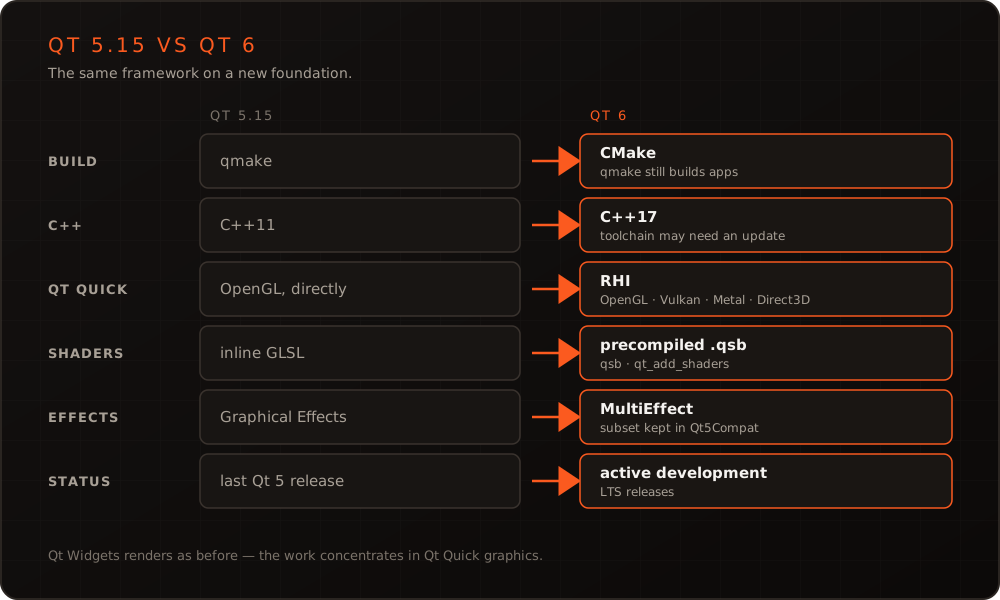
In short: Qt 6 is not a new framework. It is Qt 5 with three deep changes: CMake as the default build system, C++17 as the baseline and a graphics stack that no longer assumes OpenGL. For a Qt Widgets application on the desktop the difference is mostly invisible. For a Qt Quick interface on an embedded board it is not – custom shaders, your own OpenGL code and a handful of modules decide whether the move takes days or months. And the gap keeps widening: new features and fixes land in Qt 6, while Qt 5.15 is the end of the line.
This article compares the two versions. How to carry out the move, stage by stage, is in our roadmap for migrating from Qt 5 to Qt 6.
The comparison in one table
| Qt 5 (5.15) | Qt 6 | |
|---|---|---|
| Build system | qmake as the default, CMake supported | CMake as the default; qmake still builds applications |
| C++ standard | C++11 | C++17 |
| Qt Quick rendering | directly on OpenGL (RHI only as an opt-in preview) | through the RHI: OpenGL, Vulkan, Metal or Direct3D, chosen per platform |
| Custom shaders | GLSL strings inline in QML | precompiled .qsb files from the Qt Shader Tools |
| Graphical effects | Qt Graphical Effects | MultiEffect (since 6.5); a subset of the old effects in Qt5Compat |
QTextCodec, QRegExp | part of Qt Core | moved to the Qt5Compat module |
| Containers | int sizes, QList and QVector are separate | qsizetype sizes, QList and QVector are the same class |
| Property bindings | in QML | in QML and in C++ (QProperty) |
| High-DPI scaling | opt-in | always on |
| Status | last Qt 5 release | in active development, with LTS releases |
Most rows are a day’s work or less in a typical codebase. Two of them are not, and both sit in the graphics stack.
What stays the same
The fundamentals did not move. The object model, signals and slots, the event loop and the module structure are what they were. The QML language is largely unchanged – Qt 6 adds things, such as imports without a version number, rather than taking them away. Qt Widgets keeps its rendering backend: the Qt documentation states that the graphical backend for widget applications is unchanged – only the now always-on high-DPI scaling can change how a widgets interface looks at fractional scale factors. So a widgets application mostly needs mechanical porting, much of which the Clazy porting checks can apply automatically.
The platform plugins that matter on embedded Linux are also still there: EGLFS, LinuxFB and Wayland. If your device boots straight into a full-screen Qt application today, it can do the same with Qt 6 – our article on running Qt with EGLFS applies to both versions.
The real difference: graphics
In Qt 5, Qt Quick rendered directly with OpenGL. In Qt 6 it renders through the RHI, the Rendering Hardware Interface – an abstraction that maps onto Vulkan, Metal, Direct3D or OpenGL, depending on the platform. Unless an application asks for something specific, Qt Quick picks a platform default. On embedded Linux that is usually still OpenGL ES, so on the surface little changes. Underneath, three things do.
Shaders. A ShaderEffect no longer accepts GLSL source as a string. Shaders are now preprocessed with the tools from the Qt Shader Tools module into .qsb files that carry a variant for each graphics API, and the ShaderEffect references those files. The qt_add_shaders CMake function generates those variants by default; the qsb command-line tool produces only SPIR-V unless told otherwise (--qt6 or --glsl) – a shader built that way works with Vulkan and fails on an OpenGL ES board. In an industrial HMI with custom gauges, glows and transitions, converting every effect is often the largest single item of the migration, alongside Qt Quick Controls 1. Qt Graphical Effects are gone as well: some of them survive as Qt5Compat.GraphicalEffects, and since Qt 6.5 MultiEffect covers the common cases such as blur, shadow and colorize in one item.
Your own OpenGL code. Everything that talks to OpenGL directly needs a second look. The OpenGL convenience classes moved into the Qt OpenGL module, QOpenGLWidget into Qt OpenGL Widgets. In Qt Quick, QQuickFramebufferObject only works while the scene graph actually renders with OpenGL; an application that relies on it has to force that with QQuickWindow::setGraphicsApi(QSGRendererInterface::OpenGL). Code that issues its own OpenGL calls in beforeRendering() or afterRendering() must now wrap them in beginExternalCommands() and endExternalCommands(), so that the renderer’s cached state stays consistent. And an underlay – a video or camera image drawn beneath the interface, common on embedded devices – moves to beforeRenderPassRecording(): Qt 6 can no longer skip clearing the colour buffer, so whatever was drawn earlier is wiped.
Startup. Creating graphics pipelines costs time with the GPU drivers of small SoCs. With OpenGL, Qt has kept compiled shader programs on disk since 5.9. Qt 6.5 replaces this with a pipeline cache for every graphics API and adds explicit control over it, so an application can ship a pre-seeded cache file that also speeds up the very first start. The cache only applies when device and driver match the ones that produced it – on a desktop a gamble, on a device series with one SoC and one BSP exactly the normal case. If your device has a boot-time budget, that is worth knowing about – we cover the rest of the budget in optimizing embedded Linux boot time.
Two smaller points complete the picture. Devices without a GPU can still run Qt Quick on the software adaptation, but it cannot render ShaderEffect items or particles. And some modules depend on OpenGL themselves: in Qt Charts, accelerated series only render while Qt Quick uses OpenGL, and Qt Data Visualization supports only the OpenGL backend. Both have been deprecated since Qt 6.10; their successor, Qt Graphs, comes with migration guides from both and is what new code should use.
Modules: removed, rewritten, returned
Qt 6.0 shipped without a long list of Qt 5 modules. Anyone who looked at Qt 6 in early 2021 and dismissed it for that reason should look again – most of them came back.
- Removed or replaced for good: Qt Script (the JavaScript engine of Qt QML,
QJSEngine, takes its place), Qt XML Patterns, Qt Quick Controls 1, Qt Graphical Effects and the platform-specific Extras modules for macOS, Windows, X11 and Android, most of whose functionality moved into other modules. - Back in Qt 6.1: Qt Charts, Qt Data Visualization, Qt Virtual Keyboard, Qt Lottie and Qt SCXML, together with the new Qt State Machine module, which holds the state machine API that used to be part of Qt Core.
- Back in Qt 6.2, the first LTS release: Qt Multimedia, Qt Bluetooth, Qt NFC, Qt Positioning, Qt Serial Port, Qt Serial Bus, Qt Remote Objects, Qt Sensors, Qt WebChannel, Qt WebEngine, Qt WebSockets and Qt WebView.
- Qt 6.5: Qt Location returned as a technology preview, next to the new Qt GRPC and Qt Protobuf modules, also as previews.
“Back” does not always mean “unchanged”. Qt Multimedia was substantially reworked: device discovery, low-level audio, playback, capture and the video output pipeline all have a changed API. For a device with a camera or video path, that module deserves an assessment of its own. One embedded detail on top: since Qt 6.5 the FFmpeg backend is the default on most platforms, but not for Yocto-based builds – on a device, check which backend your image actually ships.
Licensing deserves a glance per module as well. Several add-ons – Qt Graphs and Qt Virtual Keyboard among them – are available only under GPLv3 or a commercial licence, which matters for closed device firmware. We went through what that means for the keyboard in particular in our article on Qt Virtual Keyboard on embedded devices.
Language and core libraries
Qt 6 requires C++17. On a current toolchain that is a non-event; with an aged vendor SDK it can turn the Qt migration into a toolchain update first. In return, the codebase may use the language features we describe in modern C++ for embedded systems.
The containers were consolidated: QList and QVector are now one class, and sizes are qsizetype rather than int. Most of this compiles unchanged; on 64-bit builds, code that stores a size in an int can produce conversion warnings. Text handling moved away from codecs – QTextCodec lives on in Qt5Compat, and QTextStream::setCodec() gave way to setEncoding().
The more interesting addition is bindable properties in C++. With QProperty, the binding mechanism that QML has always had works in C++ too: a value recalculates itself when its inputs change, without hand-written signal plumbing. For data models behind an HMI that is a real simplification – but an addition you can adopt gradually, not a porting obligation.
Support and maintenance: the gap only widens
Qt 6.0 shipped at the end of 2020, and the Qt 6 line has since produced several LTS releases: 6.2, 6.5, 6.8 and, since September 2026, 6.12, which The Qt Company maintains for five years. Qt 5.15 is the last Qt 5 release. Its commercial long-term support ended on 26 May 2025; since then only paid Extended Security Maintenance is available.
On an embedded device, the support calendar rarely forces the move on its own. The build system does. On Yocto, Qt 6 comes through the meta-qt6 layer maintained by The Qt Company. Keeping an old Qt 5 working inside a newer Yocto release – newer compiler, newer system libraries – is extra work that nobody shares with you. The moment usually arrives with a new SoC that needs a newer BSP.
Then there is regulation. The Cyber Resilience Act requires manufacturers of products with a data connection – to a network or to another device, which includes a USB or serial service port – to handle vulnerabilities over the product’s support period. A device that ships an open-source Qt 5.15 without security fixes makes that obligation hard to meet – we described the wider requirements in the Cyber Resilience Act and secure OTA updates.
When staying on Qt 5.15 is defensible – and when it is not
| Staying on Qt 5.15 is defensible when … | Moving to Qt 6 is due when … |
|---|---|
| the product is in maintenance only and the end of sale is in sight | the product will be developed further for years |
| hardware and BSP are frozen | a new SoC or a Yocto upgrade is planned |
| the device has no data connection at all, or a support contract covers security fixes | the device has a data connection and falls under the Cyber Resilience Act |
| no new features are planned for the interface | the interface needs features or modules that exist only in Qt 6 |
| the team spends more time on workarounds than on features |
There is a middle path that pays off in either case. Moving to Qt 5.15, clearing the deprecation warnings and switching the build to CMake is useful work even if the Qt 6 switch itself comes a year later – and it is exactly the first two stages of the migration roadmap.
How big the move is for your project
Four questions settle the size of a migration better than any line count. How much QML is there, and does it build on Qt Quick Controls 1? Does the application depend on modules that were rewritten, Qt Multimedia above all? How many custom shaders and how much hand-written OpenGL code does it contain? And are there automated tests on real hardware that would make a graphical regression visible at all?
If you have the answers, the effort can be named. If not, a time-boxed spike on your code provides them – that is what our Qt 5 to Qt 6 migration service starts with. If your team would rather carry out the migration itself, our Qt/QML training covers it as a block of its own on request.
Conclusion
Qt 6 is the same framework with a modern foundation: CMake, C++17 and a graphics stack that is no longer tied to OpenGL. For widget applications the move is largely mechanical. For Qt Quick on embedded hardware, the work sits in shaders, own OpenGL code and a few rewritten modules – and that work can be named in advance rather than discovered halfway through. The longer a product lives, the clearer the answer to “Qt 5 or Qt 6?” becomes. If you would like it answered for your codebase, get in touch.
Frequently asked questions
- Is Qt 6 faster than Qt 5?
- Not automatically. Qt 6 changes where the time goes – Qt Quick renders through the RHI, since Qt 6.5 a device can ship a pre-seeded pipeline cache, and in QML modules declared with qt_add_qml_module, bindings and functions the compiler understands are compiled to C++ – but whether your interface runs faster on your board is a measurement, not a version number. Startup in particular depends on how long the GPU driver of the SoC takes to create pipelines, which is why the cache matters on embedded devices.
- Is Qt 5 still supported?
- Qt 5.15 is the last Qt 5 release. Open-source support ended long ago, and the commercial long-term support ended on 26 May 2025; since then The Qt Company offers only paid Extended Security Maintenance. New features and fixes land in Qt 6.
- Can a codebase support Qt 5 and Qt 6 at the same time?
- In the build, yes: Qt 5.15 introduced versionless CMake targets such as Qt::Core and versionless commands, so one CMakeLists.txt can find either version during a transition. In one binary, no – mixing Qt versions in one library or executable is not supported.
- Do we have to rewrite our QML for Qt 6?
- Rarely. Most QML runs after modest changes. The work concentrates on Qt Quick Controls 1, which was removed, on ShaderEffect items with inline GLSL, on Qt Graphical Effects, and on small type changes – font.weight, for instance, is now an integer, so the string "Bold" has to become Font.Bold. One change is easy to miss: Qt Quick Controls picks its default style per platform now, Fusion on Linux, and the old default style is called Basic. An interface with customized controls should set Basic explicitly to look as it did.
More on these topics
Managing Director, bitshift dynamics
Builds hardware-adjacent software for embedded products with his team – C++, Qt/QML, Embedded Linux and the Yocto Project. bitshift dynamics has worked in this field since 2005.